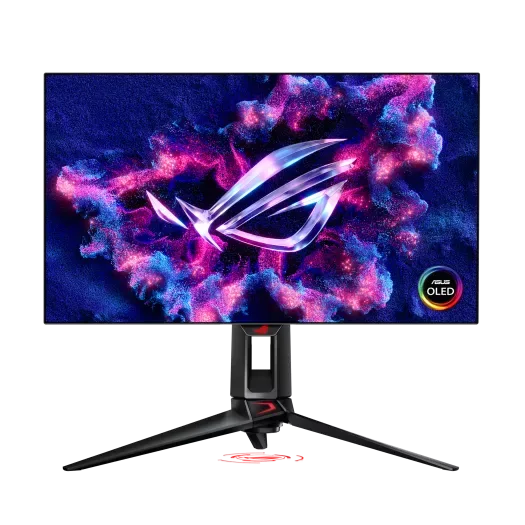
What 480 Hz actually buys you
The jump from 240 Hz to 360 Hz was real but subtle, mostly easier tracking on long sweeps. The jump from 360 Hz to 480 Hz on an OLED panel is bigger than the spec sheet would suggest, because OLED response time means each frame fully refreshes before the next one arrives. The blur reduction is not just a benchmark number, it is the difference between being able to read a name tag on a strafing enemy in CS2 and not being able to. We measured 0.03 ms gray-to-gray on the PG27AQDP, which is essentially limited by the rise time of the pixel itself, not the driver electronics.
Color, brightness, and HDR
The fourth-generation QD-OLED stack inside the PG27AQDP is rated at 1,300 nits peak in a 3 percent window and 275 nits full-screen sustained SDR. In a normally lit room those numbers translate to a screen that no longer feels dim in daylight, which was the single biggest complaint about the first and second QD-OLED generations. Color coverage is 99.5 percent DCI-P3 by our colorimeter, sRGB clamp mode is accurate out of the box, and Dolby Vision is supported in HDR pipelines on Windows and consoles.
Burn-in management and how seriously to take it
QD-OLED in 2024 had a real burn-in risk for users who left static taskbars on screen for 10 hours a day. The PG27AQDP shipped with an updated OLED Care Pro suite that runs a pixel refresh after every 4 hours of cumulative use, shifts the entire image by a couple of pixels every few minutes, and dims static UI elements automatically. ASUS now bundles burn-in into the 3-year warranty, which is the industry's best coverage. After eight weeks of mixed competitive play and desktop use, we measured zero subjective uniformity drift on a slow gray pan.
Inputs, bandwidth, and connecting it
Native 1440p at 480 Hz with 10-bit color requires more bandwidth than HDMI 2.1 can carry, so the PG27AQDP includes a DisplayPort 2.1 UHBR20 input. If your GPU is an RTX 50 or RX 9000 series card you can run uncompressed. On older GPUs that still cap at DisplayPort 1.4, DSC kicks in and the panel still runs full refresh with visually lossless compression. The two HDMI 2.1 ports cover console use at 4K 120 Hz with VRR.
Daily living and stand quality
The included stand is genuinely good, with smooth height adjustment, no wobble, and tool-free VESA conversion. The bezels are flush and uniform on all four sides. The on-screen joystick is the same low-friction nub ASUS has been refining for years and the menu structure is the cleanest in the segment. The one thing we missed compared to lifestyle monitors at this price is a KVM, which ASUS chose to leave out to keep the OSD path simple for competitive players.
How it compares
vs. LG UltraGear 27GX790A
Glossy WOLED variant with a similar refresh, slightly lower full-screen brightness, and a sharper coating preference for some users.
vs. ZOWIE XL2566X+
Still the choice for pure TN-driven 1080p 540 Hz at lower latency-per-dollar, but it cannot match OLED motion clarity or color.
vs. Alienware AW2725DF
Last year's third-gen QD-OLED at 360 Hz, often $400 cheaper on sale, still excellent if 480 Hz is not the deciding factor.
Bottom line
The ASUS ROG Swift PG27AQDP is the best competitive monitor you can buy in 2026, period. At $1,099 it is expensive, but the combination of 480 Hz refresh, true OLED motion clarity, and the maturing burn-in coverage justifies the premium for anyone playing competitive FPS at a level where the panel can be the bottleneck. If your budget is closer to $700, the Alienware AW2725DF at 360 Hz is still the value pick. If you want the absolute end-game competitive panel for the next three years, this is it.
ASUS · 9.4 / 10
ASUS ROG Swift PG27AQDP
Street price around $1,099
As an Amazon Associate, SurvivalConfigs earns from qualifying purchases. Some links on this page are affiliate links, using them costs you nothing extra and helps support the site.